Let’s be honest – lead generation often feels like a hamster wheel. You post on LinkedIn, send cold emails, and tweak your website forms, but the results are inconsistent. One month you’re flooded with inquiries, the next you’re wondering if your contact form broke.
If you run a startup or an agency, you already know the hustle. The problem isn’t that you can’t generate leads – it’s that doing it manually takes time, energy, and attention you could spend on growth.
The good news? You can build a lead generation system that runs automatically – capturing prospects, following up, and nurturing leads while you focus on strategy or delivery.
In this guide, we’ll break down exactly how to automate lead generation for your business, the tools that make it simple, and how to do it without losing the human touch.
Table of Contents
What Is Lead Generation (and Why It Needs a Makeover)
At its core, lead generation means attracting potential customers and capturing their information so you can guide them toward a purchase. It’s the lifeblood of every business — especially for startups and agencies that depend on a steady client flow.
But here’s the catch: traditional lead generation is broken.
- Cold outreach is hit or miss.
- Paid ads are getting expensive.
- Social media attention is fleeting.
In 2024, a HubSpot report showed that 61% of marketers said generating traffic and leads was their biggest challenge. The reason? Most are still doing it manually, using disconnected tools and inconsistent follow-ups.
What works now is a systematic, automated approach – one that blends smart tools, data, and personalization to create a predictable flow of high-quality leads.
Example:
Imagine you run a small digital marketing agency. Instead of manually messaging 100 prospects a week, you create a workflow that automatically:
- Scrapes leads from LinkedIn or Apollo.
- Adds them to your CRM (like HubSpot or Pipedrive).
- Sends a personalized cold email series.
- Follows up after 3 days automatically if they haven’t replied.
You’ve just saved 15+ hours a week – and your pipeline keeps moving.
Why Automating Lead Generation Changes the Game
For small businesses and agencies, automation is leverage. It doesn’t replace strategy – it multiplies your impact.
Here’s why automating lead generation is a game changer:
- Saves hours every week: No more manual prospecting or copy-pasting emails.
- Increases consistency: Follow-ups happen on time, every time.
- Scales easily: Once you build one working system, you can replicate it for new campaigns.
- Improves conversion rates: Automation helps nurture leads who aren’t ready to buy yet.
- Enhances tracking: You get data on open rates, conversions, and responses in real time.
Think of it like having a digital sales assistant who works 24/7 – one that never forgets to follow up or misplaces a lead.
Real-world example:
A small SaaS marketing firm automated its LinkedIn outreach using Phantombuster + Zapier + Lemlist. In 60 days, they went from 4 qualified leads a month to 23, while reducing manual work by 80%.
The key wasn’t more effort – it was better systems.
Read Also : A Guide to Business Automation
How to Automate Lead Generation for Your Agency (Step-by-Step)
Let’s make this practical. Here’s how you can set up automated lead generation from scratch.
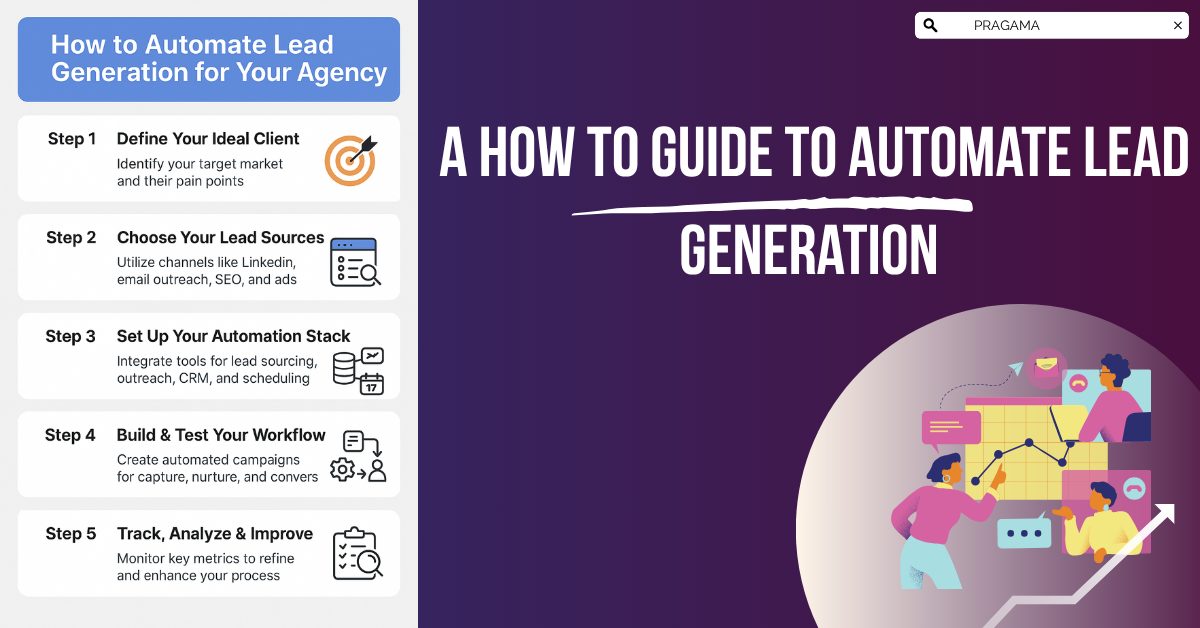
Step 1: Define Your Ideal Client
Automation is useless if your targeting is off.
Before setting up any tools, define:
- What type of clients you want (niche, company size, industry).
- Their pain points (e.g., “struggling to get consistent inbound leads”).
- Where they spend time online (LinkedIn, email, Slack communities, etc.).
Example:
Instead of “helping all small businesses,” say:
“We help e-commerce brands doing $50K–$200K/month scale to 7 figures through paid ads.”
That clarity makes your automation focused and effective.
Step 2: Choose Your Lead Sources
Leads don’t appear magically – they come from channels. The best lead generation systems combine multiple sources.
Here are proven ones:
- LinkedIn – great for B2B agencies.
- Email Outreach – cold email still converts if done right.
- SEO & Content – long-term, organic, compounding growth.
- Ads – paid media for fast results.
- Referrals & Partnerships – most overlooked, yet most profitable.
Pick 2–3 that suit your business model. You can always expand later.
Read Also : Growing Business Through Content Marketing
Step 3: Set Up Your Automation Stack
Now comes the fun part – building your toolkit.
Core Tools for Lead Generation Automation:
| Function | Recommended Tools |
|---|---|
| Lead sourcing | Apollo, Clay, UpLead |
| Email outreach | Instantly, Lemlist, Smartlead |
| CRM | HubSpot, GoHighLevel, Pipedrive |
| Automation workflows | Zapier, Make, HubSpot Workflows |
| Scheduling & follow-up | Calendly, TidyCal |
Example workflow:
Apollo (lead list) → Zapier (data transfer) → HubSpot CRM → Instantly (outreach) → Calendly (booking)
You’ve now connected all your systems – when someone replies or books a call, your CRM updates automatically.
Step 4: Build & Test Your Workflow
Start simple. Build one automation flow and refine it.
Here’s a sample 3-step process:
- Capture: Add new leads from LinkedIn or a form.
- Nurture: Send automated follow-ups over 7–10 days.
- Convert: Direct them to a calendar link or free consultation page.
Pro Tip: Personalization still matters.
Use dynamic tags like {FirstName} or {CompanyName}, but avoid robotic phrasing. Your automation should feel like a human message sent at scale.
Step 5: Track, Analyze & Improve
The best automation systems are never static.
Every 2 weeks, review your analytics:
- Open rate (aim for 60%+)
- Reply rate (aim for 15–20%)
- Meeting booked rate (aim for 5–10%)
- Cost per lead
Cut what’s not working, double down on what is.
For example, if your first email underperforms, A/B test your subject line. If a lead magnet converts well, promote it more.
Lead Generation Tools You Actually Need (and What to Skip)
There’s a shiny new “AI lead gen” tool every week. Don’t fall for the hype. You only need a few solid ones.
Start with these essentials:
- Prospecting: Apollo, Clay, or PhantomBuster to collect and verify leads.
- Outreach: Instantly or Lemlist for cold email campaigns.
- CRM: HubSpot or GoHighLevel to manage your pipeline.
- Automation: Zapier or Make for workflow connections.
- Analytics: Google Sheets or Notion dashboards to visualize performance.
Skip:
Complex enterprise software with high setup costs and low ROI. Focus on lightweight, modular tools that integrate easily.
Common Lead Generation Mistakes (and How to Avoid Them)
Even with the best systems, many agencies still struggle. Here’s why:
- Over-automation.
People can tell when it’s robotic. Keep real human touchpoints in your process. - Poor segmentation.
Not all leads are equal. Tag them by source, interest, or stage in your CRM. - Neglecting follow-ups.
80% of sales need 5 or more follow-ups – don’t stop after one email. - Ignoring data.
If you can’t measure it, you can’t improve it. Track conversions by channel. - Not testing offers.
Your messaging matters more than your automation tools. Test multiple angles.
Example:
A design agency sent one cold email template to every industry. Their open rate stayed below 10%. When they segmented campaigns by vertical (e.g., “SaaS landing page design”), open rates shot to 58%.
Measuring and Optimizing Your Lead Generation System
Automation without measurement is guesswork.
Here’s what to monitor monthly:
- Lead Quantity: How many new leads are entering your system?
- Lead Quality: How many match your target profile?
- Conversion Rate: How many turn into actual sales calls or customers?
- Response Time: How quickly you engage after a lead interacts.
Use your CRM dashboards or Google Sheets to visualize progress.
Over time, aim to build predictable lead generation – where you know that X number of leads equals Y amount of revenue.
Conclusion: Build Your Lead Generation Machine Today
You don’t need a 10-person sales team to grow your agency. You need a system that works while you sleep.
Start small. Automate one workflow – maybe your follow-ups or CRM updates. Once it works, add the next layer. Within weeks, your lead generation becomes a machine that runs itself.
Call to Action:
Map out your lead generation process today.
- What’s manual?
- What can be automated?
- Which tools can you connect right now?
Your future calendar full of clients starts with one smart system.
Actionable Summary
| Step | Action |
|---|---|
| 1. Define your target client | Identify niche, industry, and key decision-makers |
| 2. Pick lead sources | Choose 2–3 channels like LinkedIn or cold email |
| 3. Set up tools | CRM + automation + outreach tools |
| 4. Automate workflows | Connect everything with Zapier or HubSpot |
| 5. Track & improve | Measure results and optimize campaigns |
| 6. Scale | Add more workflows as results stabilize |
Within a month, you can move from chaos to clarity – where your lead generation is not a chore, but a system.